Running successful Google Ads campaigns isn’t just about selecting the right keywords or increasing your advertising budget. The creative assets behind your campaign play an equally important role in determining how often your ads are shown, how engaging they are, and ultimately how many enquiries or sales they generate.
Over the last few years, Google Ads has shifted towards AI-powered campaign types such as Performance Max and Responsive Display Ads. Instead of relying on a single advertisement, Google’s machine learning automatically combines your images, videos, headlines, descriptions and logos to build thousands of different ad combinations. It then continuously tests these combinations to determine which creative performs best for different audiences, devices and placements.
This means your creative assets are no longer just supporting your campaign—they’re driving it.
The more high-quality assets you provide, the more opportunities Google’s AI has to optimise your campaigns and improve performance. On the other hand, providing only the minimum requirements can limit where your ads appear and reduce Google’s ability to find winning combinations.
We’ve created this guide to help our clients understand exactly what Google looks for when building campaigns. Whether you’re preparing assets for a brand-new campaign or refreshing an existing one, you’ll find everything you need to know, including image specifications, video requirements, copy recommendations and best practices that will help your campaigns perform at their best.
Rather than treating this as a list of technical specifications, think of it as a practical checklist. If you can provide the assets recommended throughout this guide, you’ll be giving your Google Ads campaigns the strongest possible foundation for success.
Performance Max Creative Asset Requirements
Performance Max is Google’s most powerful campaign type, allowing your ads to appear across the entire Google network from a single campaign. This includes Google Search, YouTube, Gmail, Google Maps, Discover, the Display Network and other Google-owned properties.
Unlike traditional Search campaigns, Performance Max doesn’t rely on a single advertisement. Instead, Google automatically combines your creative assets—including images, videos, headlines, descriptions and logos—to create thousands of different ad variations. It then uses machine learning to determine which combinations perform best for different users, devices and placements.
Because your ads can appear almost anywhere within Google’s ecosystem, it’s important to provide a variety of high-quality assets in different formats. Supplying only the minimum requirements limits Google’s ability to optimise your campaign, while a diverse asset library gives the platform more opportunities to test, learn and improve performance over time.
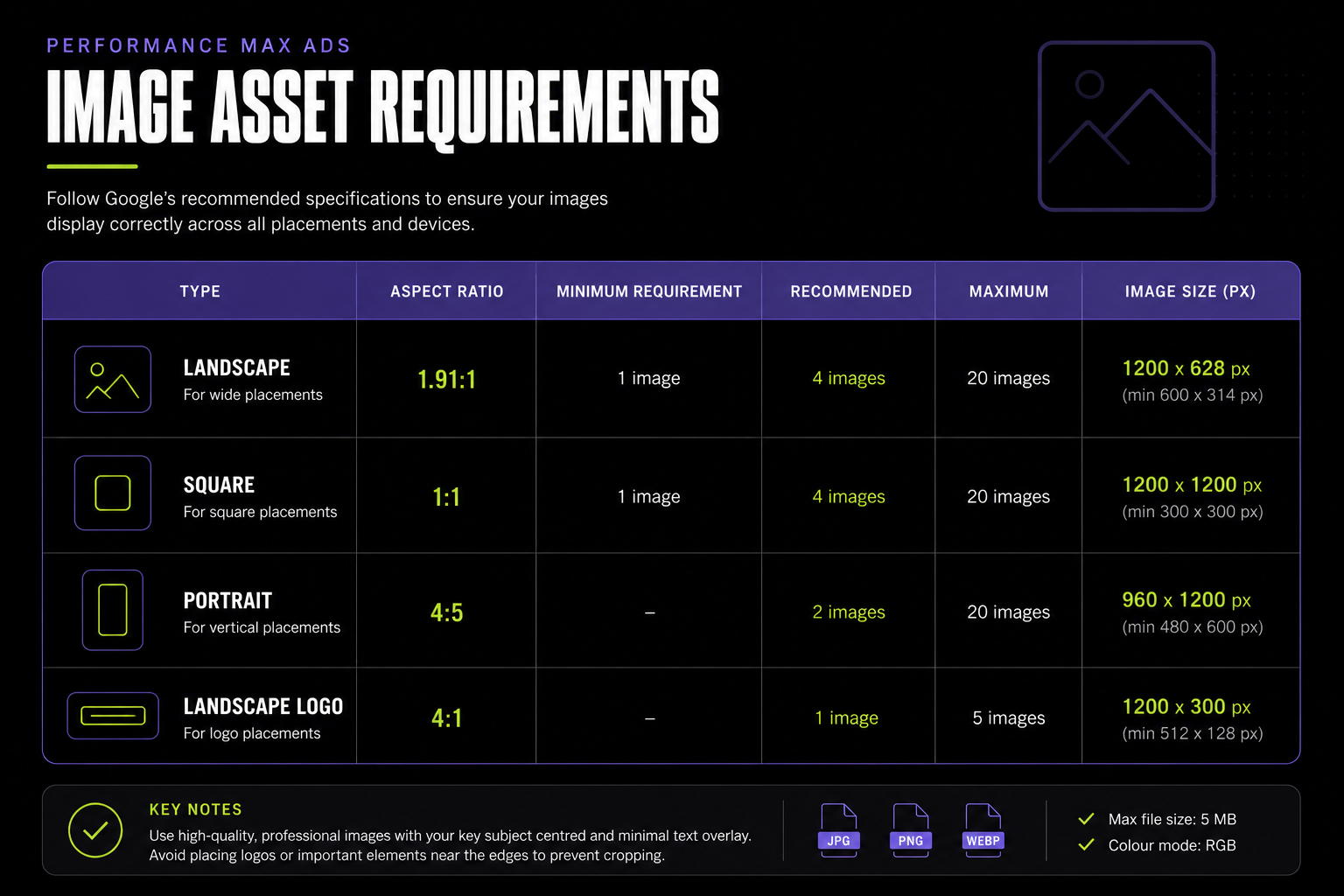
The infographic below summarises Google’s recommended creative asset requirements for Performance Max campaigns. Use it as a quick reference when preparing your files before launching your campaign.
Breaking Down Each Asset Type
Images
Images are often the first thing people notice when they see your ad. Google recommends uploading a combination of landscape, square and portrait images, as each aspect ratio is used in different placements across its advertising network.
Whenever possible, use original, high-resolution photography that accurately represents your business. Photos of your team, completed projects, products or services generally perform much better than generic stock images because they build trust and help potential customers understand exactly what you offer.
To maximise performance:
- Upload as many unique images as possible rather than multiple versions of the same photo.
- Keep your main subject centred so it isn’t cropped in different placements.
- Avoid adding large amounts of text, borders or promotional graphics to your images.
- Ensure all images are sharp, well-lit and professionally presented.
Video
Video assets are becoming increasingly important in modern Google Ads campaigns.
While Google can generate simple videos automatically if none are provided, these rarely perform as well as custom videos created specifically for your business. Even a short video filmed on a modern smartphone can significantly improve campaign performance if it clearly showcases your products, services or team.
For the best results:
- Use landscape, square and vertical formats where possible.
- Keep videos at least 10 seconds long.
- Upload high-definition (1080p or higher) footage.
- Include subtitles if your message relies on spoken audio.
- Choose an engaging thumbnail, as this is often the first thing users will see.
Authentic videos consistently outperform highly polished promotional videos because they feel more genuine and relatable.
Headlines & Descriptions
Your written copy is just as important as your visuals.
Google combines your headlines and descriptions in different ways depending on where the ad appears and who is viewing it. This means every headline should make sense on its own while also working alongside your other assets.
Rather than repeating the same message multiple times, create a variety of headlines that highlight different benefits of your business. Some might focus on pricing, others on quality, experience, customer service or your unique selling proposition.
For descriptions, aim to expand on your headlines by explaining why someone should choose your business and what action you want them to take next.
The more variety you provide, the more opportunities Google’s AI has to discover which messaging resonates most with different audiences.
Our Recommendation
Although Google specifies minimum asset requirements, we rarely recommend stopping there.
The best-performing campaigns typically include multiple images for every aspect ratio, professionally designed logos, several high-quality videos and a wide range of headlines and descriptions. This gives Google’s machine learning the flexibility it needs to continuously test new combinations and improve campaign performance over time.
Think of every additional high-quality asset as another opportunity for Google to find your next winning advertisement.
Performance Max Image Asset Requirements
Images are one of the most influential assets in any Performance Max campaign. They often create the first impression of your business and play a significant role in how your ads perform across Google’s network.
Unlike Search campaigns, where users primarily engage with text, Performance Max campaigns display visual content across YouTube, Gmail, Discover, Maps and the Google Display Network. Because each placement has different dimensions and layouts, Google requires multiple image formats to ensure your ads always look professional.
Rather than simply uploading one great photo and hoping it works everywhere, Google recommends building a library of images in different aspect ratios. This gives the platform more flexibility to serve your ads across a wider range of placements while maintaining the best possible user experience.
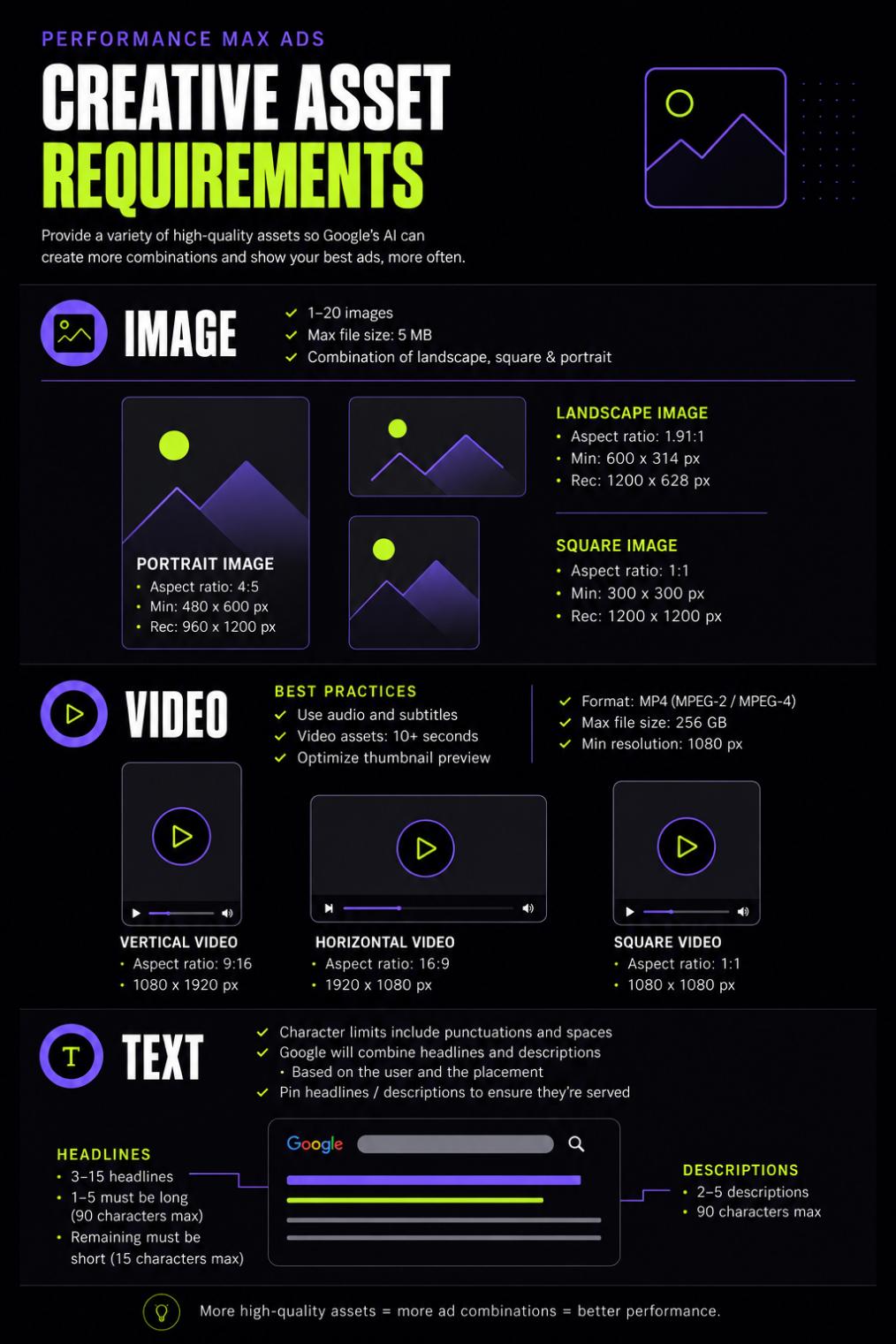
Use the infographic below as a quick reference when preparing your campaign assets. It summarises Google’s recommended image specifications, quantities and file requirements for Performance Max campaigns.
Understanding Each Image Format
Landscape Images (1.91:1)
Landscape images are the most commonly used format within Performance Max campaigns. They’re displayed across a wide variety of placements, including the Google Display Network, Gmail promotions and certain YouTube companion ads.
Google requires at least one landscape image, but we strongly recommend providing four or more unique images. This allows the platform to test different visuals and helps prevent creative fatigue over time.
Whenever possible, choose images that clearly showcase your products, completed projects or team in action. Keep the primary subject centred within the frame and leave some space around the edges, as Google may crop images slightly depending on the placement.
Square Images (1:1)
Square images are incredibly versatile and are commonly used across mobile placements, Discover feeds and responsive display ads.
Rather than simply cropping your landscape images into a square, create compositions specifically designed for the 1:1 format. This ensures your subject remains balanced and visually engaging regardless of where the ad appears.
Like landscape images, Google recommends uploading multiple square images that showcase different aspects of your business.
Portrait Images (4:5)
Portrait images aren’t mandatory, but they are highly recommended.
As more users browse on mobile devices, vertical placements continue to grow across Google’s advertising network. Portrait images make better use of these placements by filling more of the screen and creating a more immersive experience.
If you’re organising a professional photo shoot, it’s worth capturing both landscape and portrait versions of key scenes. Doing this once will give you a much stronger asset library for future campaigns.
Landscape Logos (4:1)
Your logo reinforces brand recognition across every campaign.
Google recommends supplying both square and landscape versions of your logo so it can display your branding appropriately across different placements.
Always upload the highest-quality version available, preferably as a PNG with a transparent background. Avoid placing your logo inside promotional graphics or banners, as Google treats logos as standalone branding assets.
Image Best Practices
Meeting Google’s technical specifications is only part of the process. The quality of your photography has an equally important impact on campaign performance.
When selecting images, ask yourself whether someone who has never heard of your business could quickly understand what you do. Authentic photos of your team, products, completed work or customers usually outperform generic stock photography because they build trust and make your ads feel genuine.
For the best results, we recommend:
- Using professionally lit, high-resolution images.
- Showing real people, products or completed projects wherever possible.
- Keeping your branding subtle rather than filling images with promotional text.
- Leaving enough space around key subjects to accommodate Google’s automatic cropping.
- Uploading a variety of images that highlight different services, products or customer experiences.
The more high-quality assets you provide, the more opportunities Google’s AI has to identify the combinations that generate the best results.
Static Display Ad Sizes
While Performance Max campaigns automatically adapt your creative for different placements, there are still situations where manually designed display banners are the better choice.
Static display ads are commonly used in managed Display campaigns, remarketing campaigns and brand awareness campaigns where you want complete control over the design. Instead of relying on Google’s automated layouts, you create fixed-size banners that appear across websites and apps within the Google Display Network.
Because these banners don’t resize automatically, Google supports a range of standard dimensions. Designing your ads in the correct sizes ensures they display properly and gives your campaigns access to a larger range of available placements.
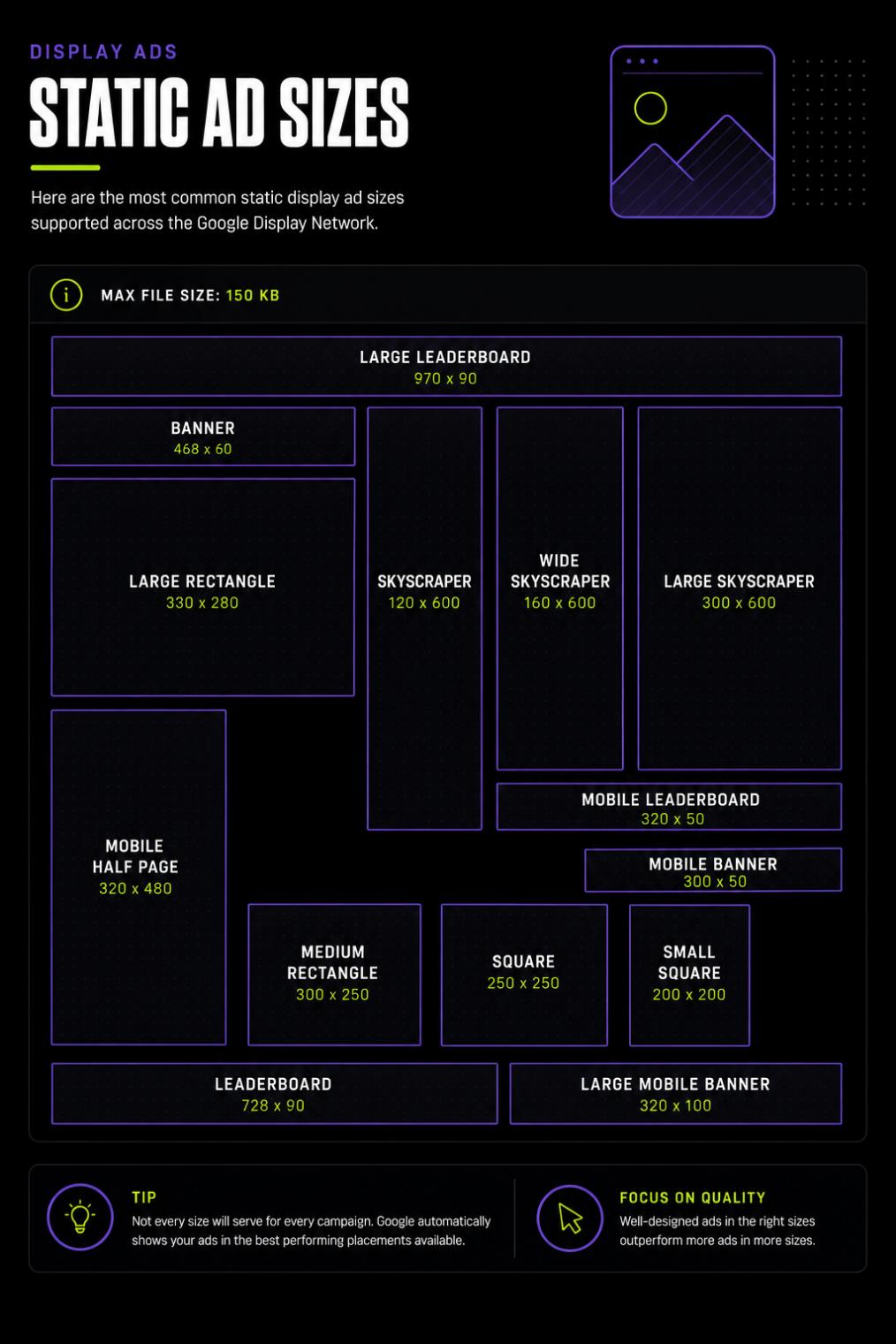
The infographic below highlights the most commonly used static display banner sizes supported by Google Ads. While Google supports additional dimensions, these are the sizes we recommend prioritising as they cover the majority of available inventory.
Understanding the Most Common Display Sizes
Although Google supports dozens of banner dimensions, not every size performs equally. Some placements are far more common than others, making certain banner sizes much more valuable.
Large Leaderboard (970 × 90 px)
The Large Leaderboard is typically used across desktop websites and provides excellent visibility at the top of a page. It’s one of the most effective formats for brand awareness campaigns.
Leaderboard (728 × 90 px)
This remains one of Google’s most widely supported banner sizes and works well across news websites, blogs and publisher networks.
Medium Rectangle (300 × 250 px)
Arguably the most important display ad size, the Medium Rectangle is supported across both desktop and mobile placements. If you’re only creating a limited number of banners, this should always be included.
Large Rectangle (336 × 280 px)
Very similar to the Medium Rectangle but slightly larger, this format provides more space for imagery and messaging while remaining highly compatible across Google’s Display Network.
Mobile Half Page (320 × 480 px)
Designed specifically for mobile devices, this larger vertical format creates a more immersive advertising experience and often achieves strong engagement on smartphones.
Skyscraper & Wide Skyscraper
The 120 × 600 px and 160 × 600 px formats are commonly displayed in website sidebars. While not every campaign requires them, they help increase available inventory for desktop placements.
Square & Small Square
The 250 × 250 px and 200 × 200 px formats are useful for websites with smaller advertising spaces. They aren’t as widely used as rectangular formats but are still worth including if you’re building a comprehensive banner set.
Mobile Banner & Mobile Leaderboard
These compact formats are designed specifically for mobile websites and applications. Although they contain less creative space, they remain important for expanding your campaign’s reach across mobile devices.
Best Practices for Static Display Ads
Unlike responsive ads, static banners don’t automatically rearrange your content. Every design needs to work perfectly at its intended size, which means careful planning is essential.
Keep your messaging concise and avoid overcrowding the design with too much text. Your logo, headline and call-to-action should be immediately visible without competing for attention.
High-quality imagery remains just as important as it is in Performance Max campaigns. Use clean, professional photography and maintain consistent branding across every banner size so users instantly recognise your business, regardless of where your ad appears.
Google also recommends keeping static display ads under 150 KB to ensure they load quickly across the Display Network.
New Wave Tip
You don’t need to design every banner size from day one.
If you’re working with a limited budget, focus on the formats that provide the greatest reach:
- Medium Rectangle (300 × 250 px)
- Leaderboard (728 × 90 px)
- Large Leaderboard (970 × 90 px)
- Mobile Half Page (320 × 480 px)
These four sizes cover a significant portion of Google’s available Display inventory and provide an excellent starting point for most campaigns.
HTML5 Display Ads
If you’re looking to create more engaging display advertising, HTML5 ads offer capabilities that standard static banners simply can’t match.
Unlike traditional image ads, HTML5 ads support animation, interactive elements and richer visual experiences. They can include animated transitions, moving graphics, expanding elements and interactive calls to action, making them a popular choice for remarketing campaigns and brand awareness campaigns where capturing attention is the primary goal.
Because HTML5 ads are more advanced than standard image banners, Google has stricter technical requirements regarding file structure, supported formats and file sizes. They must also be uploaded as packaged ZIP files containing all the assets required for the advertisement to function correctly.
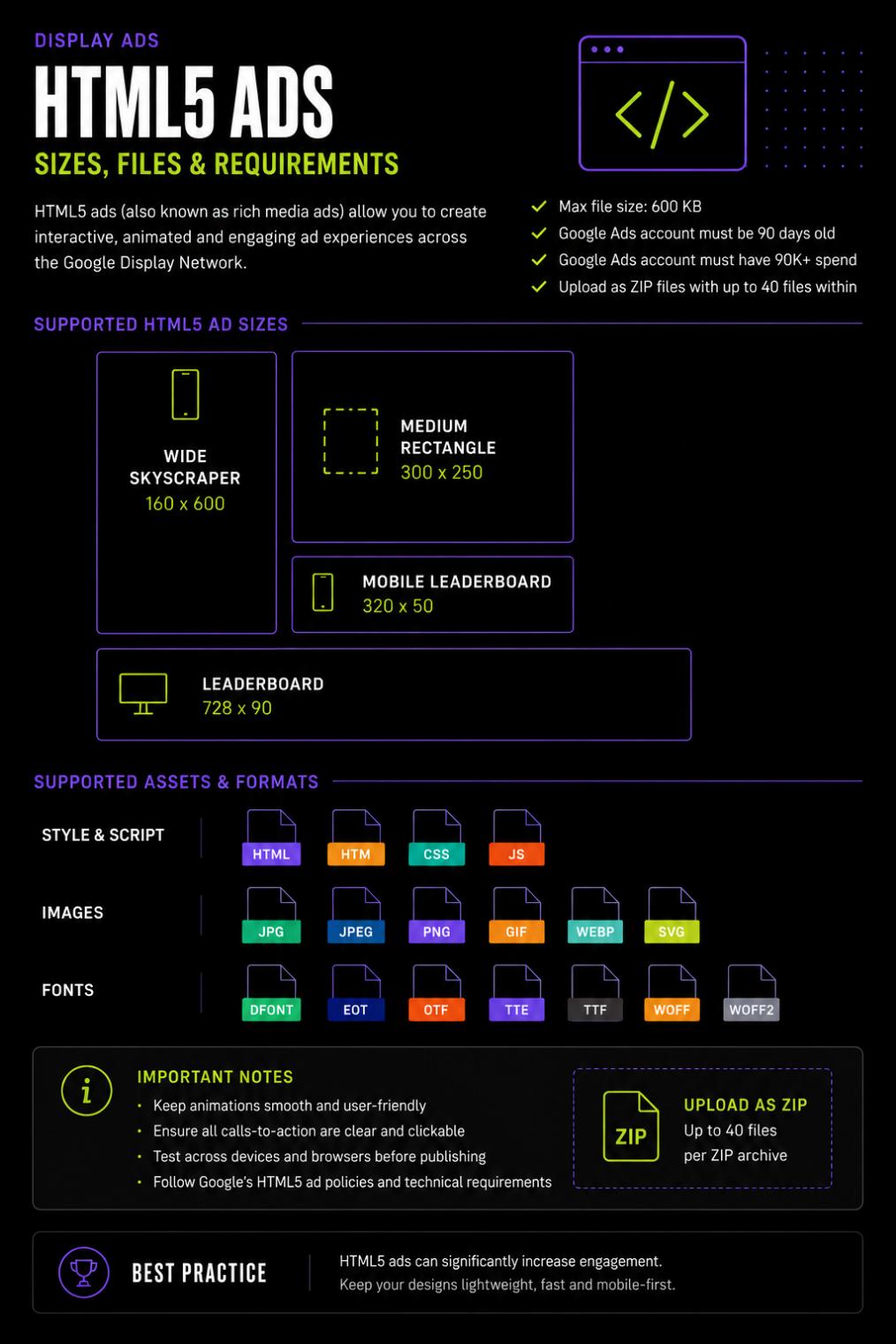
The infographic below summarises Google’s recommended requirements for HTML5 display ads, including supported file formats, dimensions and technical limitations.
HTML5 Asset Requirements
Before uploading an HTML5 display ad to Google Ads, it’s important to ensure your files meet Google’s publishing requirements.
Your ZIP package should contain all of the creative assets needed to display the advertisement correctly, including HTML, CSS, JavaScript, images and any required fonts. Missing files or incorrect folder structures can prevent your ads from being approved.
Google currently supports common image formats such as PNG, JPG, JPEG, GIF and SVG, while custom web fonts should only be included where necessary to keep overall file sizes as small as possible.
One of the most important limitations is the maximum compressed ZIP file size. Keeping files lightweight helps ads load quickly across websites and mobile devices, improving the user experience while meeting Google’s advertising policies.
When Should You Use HTML5 Ads?
Although HTML5 ads can deliver impressive visual experiences, they aren’t the right choice for every campaign.
They’re best suited to:
- Brand awareness campaigns.
- Display remarketing campaigns.
- Product launches.
- Seasonal promotions.
- Businesses wanting animated or interactive advertising.
If your primary objective is lead generation through Google Search or Performance Max, static images and responsive assets will usually provide better value for the time and investment required.
Best Practices
Successful HTML5 ads balance creativity with performance.
Animations should enhance the message rather than distract from it. Keep movements smooth and purposeful, ensuring your branding and call-to-action remain visible throughout the advertisement.
Try to keep the total animation length short, avoid excessive motion and optimise every asset to minimise loading times. A lightweight, well-designed HTML5 ad will almost always outperform a visually complex advertisement that loads slowly.
Consistency is equally important. Your colours, typography and messaging should match your website and other campaign assets so users enjoy a seamless brand experience from the moment they see your ad through to the landing page.
Our Professional Advice
HTML5 ads can deliver excellent results, but they’re rarely the first asset we recommend creating.
For most businesses, your budget is better invested in building a strong library of images, videos and responsive creative first. Once those foundations are in place, HTML5 ads become an excellent way to expand your Display campaigns with more engaging and interactive experiences.
Responsive Display Ad Requirements
Responsive Display Ads are designed to automatically adapt to the available advertising space across millions of websites, apps and Google-owned properties.
Rather than uploading individual banners for every possible size, you provide Google with a collection of creative assets—including images, logos, headlines, descriptions and videos—and Google’s machine learning assembles them into different ad variations depending on where the advertisement appears.
This approach allows your campaigns to reach significantly more placements while continuously testing different combinations to improve performance over time. It’s one of the reasons Responsive Display Ads have become the recommended display format for most advertisers.
The quality and variety of the assets you provide directly influence how effectively Google can optimise your campaign. Supplying multiple images, headlines and descriptions gives Google’s AI more opportunities to identify the combinations that generate the highest engagement and conversion rates.
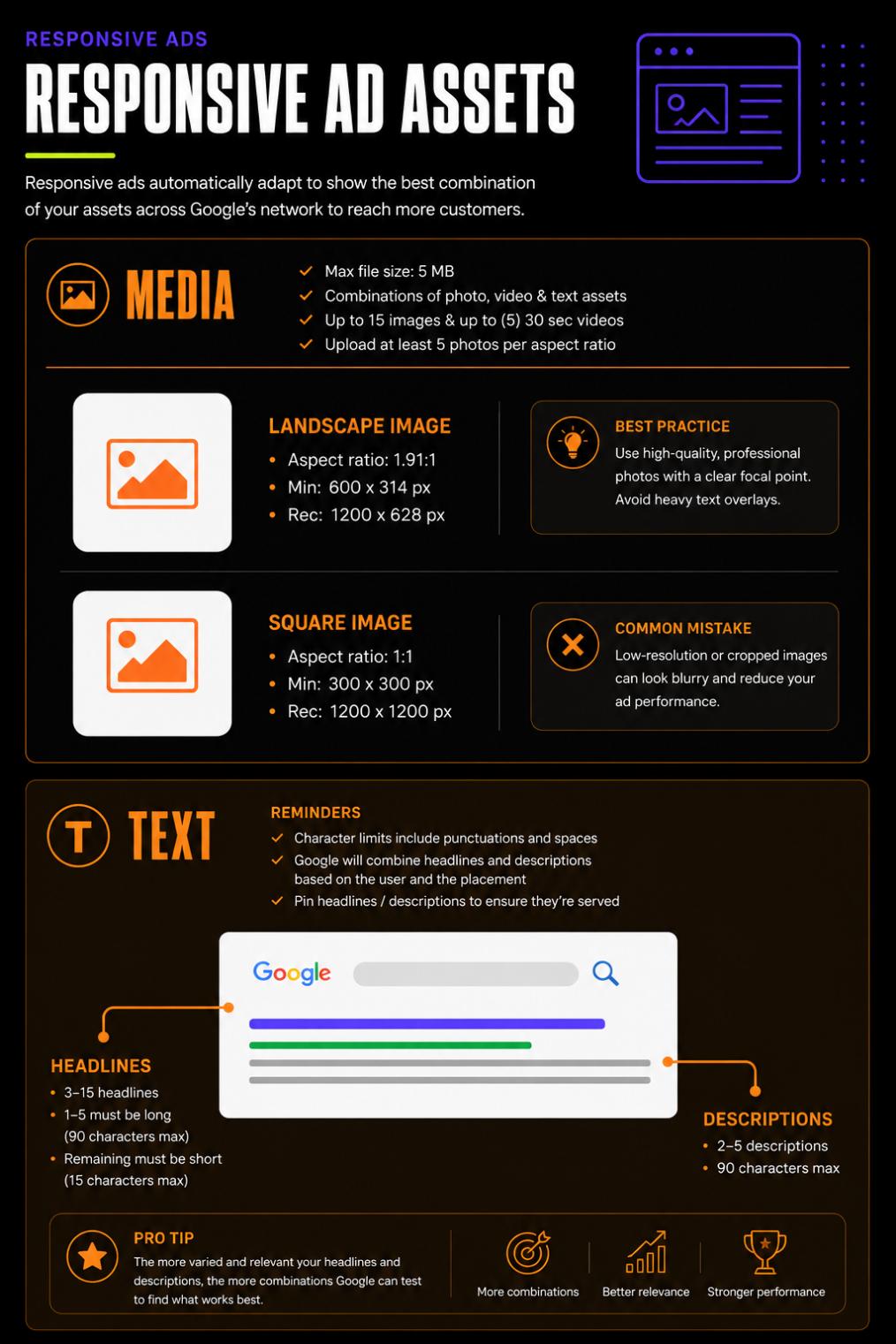
The infographic below summarises Google’s recommended asset requirements for Responsive Display Ads. Use it as a checklist when preparing your campaign assets.
Understanding Each Asset
Marketing Images
Marketing images are the visual foundation of your display ads. Google recommends supplying both landscape and square images to maximise the number of placements your ads can appear in.
Choose authentic, high-quality photography that clearly represents your products, services or team. Avoid heavily edited images, excessive promotional text or low-resolution graphics, as these can reduce both the appearance and performance of your ads.
Providing multiple image variations also helps prevent creative fatigue and allows Google’s AI to continually test new combinations.
Logos
Your logo reinforces brand recognition throughout every campaign.
Both square and landscape logo formats should be uploaded whenever possible. Use transparent PNG files with sufficient padding around the logo to ensure it displays correctly across different layouts.
Avoid incorporating your logo into promotional banners or advertisements, as Google treats logos as standalone branding assets.
Headlines
Headlines are one of the most dynamic parts of a Responsive Display Ad.
Google rotates different headline combinations depending on the placement and the user viewing the advertisement. For that reason, every headline should communicate a unique benefit rather than repeating the same message in different words.
Good headline variations might focus on:
- Your core service.
- Customer benefits.
- Trust signals.
- Offers or promotions.
- Calls to action.
Providing a range of headline styles gives Google’s machine learning more opportunities to determine what resonates with different audiences.
Long Headlines
Long headlines allow you to communicate more context while maintaining flexibility across larger display placements.
Rather than simply extending your shorter headlines, use this space to explain your value proposition more clearly.
Think about the questions potential customers are asking before they click. A strong long headline often answers one of those questions immediately.
Descriptions
Descriptions support your headlines by adding additional information about your business, products or services.
Focus on communicating value rather than simply listing features. Explain why someone should choose your business and what makes your offer different from the competition.
Keep your language natural and conversational. Google’s AI performs best when it has multiple unique descriptions to test rather than several versions of the same sentence.
Business Name
Although it might seem like a small detail, your business name appears throughout many Responsive Display Ads and should always match your branding exactly.
Using a consistent business name across Google Ads, your website and your Google Business Profile helps reinforce trust and brand recognition.
Video Assets
Video isn’t mandatory, but it’s highly recommended.
Providing video assets allows your campaigns to appear across additional placements, including YouTube, and gives Google’s machine learning another creative format to test.
Even short videos introducing your business, showcasing completed projects or demonstrating your services can significantly improve campaign performance.
Best Practices for Responsive Display Ads
Responsive Display Ads perform best when you provide Google with variety.
Rather than uploading the minimum number of assets, build a diverse creative library that includes multiple image styles, several headline variations and descriptions that focus on different customer benefits.
Every asset should be capable of standing on its own while also working effectively alongside every other asset in your campaign.
Think of your assets as building blocks. The more high-quality building blocks you provide, the more opportunities Google’s AI has to create advertisements that connect with the right audience at the right time.
Our Expert Tip
When preparing assets for a Responsive Display campaign, don’t create multiple versions of the same message.
Instead, give Google genuine variety.
Use different photos, highlight different benefits, showcase different services and write headlines from different angles. This gives Google’s machine learning meaningful combinations to test and almost always delivers stronger long-term performance than repeating the same creative in multiple formats.
Creative Best Practices
At this point, you know what Google requires—but meeting the minimum specifications is only half the equation.
The most successful Google Ads campaigns don’t just have the correct image dimensions or the right number of headlines. They combine technically compliant assets with creative that captures attention, builds trust and encourages users to take action.
Whether you’re photographing completed projects, designing display banners or writing ad copy, following a few best practices can significantly improve your campaign performance.
Use Authentic Photography Whenever Possible
One of the biggest mistakes businesses make is relying solely on generic stock photography.
While stock images can occasionally fill a gap, they rarely communicate what makes your business unique. Customers are far more likely to engage with real photos of your team, products, completed projects or workplace because they provide authenticity and help build trust.
If you’re investing in professional photography, think beyond your website. Capture a variety of horizontal, square and portrait compositions during the same photoshoot so the images can be reused across Google Ads, social media, email marketing and your website.
Keep Your Branding Consistent
Every asset you upload should feel like it belongs to the same brand.
Your colours, typography, logo placement and visual style should remain consistent across every image, video and display banner. Consistency helps people recognise your business quickly, even if they don’t click your advertisement the first time they see it.
Remember, many potential customers will see your ads multiple times before deciding to contact you.
Avoid Text-Heavy Images
Google already provides dedicated spaces for headlines, descriptions and calls to action.
Filling your images with promotional text often makes them harder to read, particularly on mobile devices where images are displayed at much smaller sizes.
Instead, let your photography do the storytelling while your written copy communicates the offer.
Simple, clean imagery almost always outperforms busy promotional graphics.
Think Mobile First
More than half of Google Ads impressions now occur on mobile devices.
Before uploading any creative, ask yourself how it will look on a smartphone.
Will the subject still be obvious?
Will important details be cropped?
Will the image remain clear at a smaller size?
Designing with mobile users in mind usually results in cleaner, more effective creative across every placement.
Build a Variety of Assets
One of the biggest advantages of Google’s machine learning is its ability to test different creative combinations.
However, this only works if you provide genuine variety.
Instead of uploading ten similar images or writing fifteen headlines that say essentially the same thing, create assets that approach your business from different angles.
Highlight different services.
Showcase different products.
Feature different team members.
Focus on different customer benefits.
The more variety you provide, the more opportunities Google has to discover which combinations resonate best with your audience.
Review Your Assets Before Launch
Before launching any campaign, take a few minutes to review everything together.
Ask yourself:
- Are all images high resolution?
- Does every image represent the business professionally?
- Have you supplied landscape, square and portrait formats?
- Is your logo clear and up to date?
- Have you uploaded videos where possible?
- Do your headlines communicate different benefits?
- Do your descriptions complement your headlines rather than repeat them?
A quick review before launch can save valuable optimisation time later.
New Wave Tip
Don’t think about creative assets as something you produce once for a single campaign.
Instead, build a growing library of professionally branded images, videos and marketing copy that can be reused across future campaigns.
Every new photoshoot, completed project and customer testimonial becomes another asset that Google’s AI can use to improve your advertising performance over time.
Google Ads Creative Asset Checklist
Before sending your assets to your marketing team—or launching your next Google Ads campaign—use this checklist to make sure you have everything you need.
Images
☐ Landscape images (1.91:1)
☐ Square images (1:1)
☐ Portrait images (4:5, recommended)
☐ High-resolution files (1200px+ where possible)
☐ Professional photography with good lighting
☐ Minimal or no text overlays
☐ A variety of products, services, projects or team photos
Branding
☐ Square logo
☐ Landscape logo
☐ Transparent PNG files where available
☐ Consistent colours and branding across all assets
Video
☐ At least one promotional video
☐ HD quality (1080p or higher)
☐ Landscape, square or vertical formats where possible
☐ Clear audio and branding
Ad Copy
☐ Multiple headlines
☐ Long headline
☐ Multiple unique descriptions
☐ Clear call-to-action
☐ Business name exactly matches your branding
Final Review
Before launching your campaign, ask yourself one final question:
If someone had never heard of your business before, would these assets clearly communicate who you are, what you do and why they should choose you?
If the answer is yes, you’re giving Google’s AI the strongest possible foundation to build high-performing ads.
Modern Google Ads campaigns rely on much more than keywords and bidding strategies. Creative assets have become one of the biggest drivers of campaign success, influencing where your ads appear, how they look and how effectively Google’s machine learning can optimise performance.
Providing Google with a diverse library of high-quality images, logos, videos and ad copy doesn’t just help your campaigns meet the platform’s requirements—it gives Google’s AI more opportunities to test, learn and continuously improve your results.
The good news is that you don’t need to produce everything overnight.
Start by building a strong collection of authentic, professionally branded assets that accurately represent your business. Every new photoshoot, completed project, testimonial and promotional video becomes another valuable piece of your marketing library that can be reused across future campaigns.
At New Wave Digital Marketing, we review every creative asset before launching a campaign to ensure it meets Google’s latest recommendations and gives your business the best possible chance of success.
If you’re unsure whether your current assets are campaign-ready—or you’d like advice on improving them—our team is always happy to help. A quick review before launch can make a significant difference to how your campaigns perform.
Need help preparing your Google Ads creative? Get in touch with New Wave Digital Marketing and we’ll make sure your campaigns are built on the strongest possible creative foundation.