
A form submission travels through five or six separate systems before it reaches your inbox, and any one of them can quietly lose it. Here's the full journey, what we've fixed, and how to check your own leads.
When someone fills out the contact form on your website, it feels like it should just arrive. They hit send, you get an email, you call them back. Simple.
It isn’t simple. Between that form and your inbox sits a chain of separate systems, each with its own rules, and any one of them can quietly send a genuine enquiry to spam, or drop it entirely. Most business owners never see this machinery until a customer says “I filled out your form last week and never heard back,” and by then the lead is cold.
This is a plain-English walkthrough of what actually happens between a website form and your inbox, every point where things break, and what we build and maintain to make it reliable. We’ll name the specific tools involved, because understanding the moving parts is the difference between a website that quietly loses you business and one that’s actually looked after.
A form submission has to travel through five or six different systems before it reaches you. If the email isn’t properly authenticated along the way (proving it’s really from who it says it’s from), the receiving inbox treats it with suspicion. On top of that, a large share of form submissions aren’t real leads at all; they’re bots and cold sales pitches. The receiving inbox is trying to filter those out, and sometimes it catches real enquiries in the same net.
The fix is two separate jobs: making sure real leads are properly authenticated so they’re trusted, and filtering out the junk before it ever reaches the inbox. They’re different problems with different solutions, and it helps to keep them apart in your head.
Here’s the actual path a lead takes on a typical WordPress site.
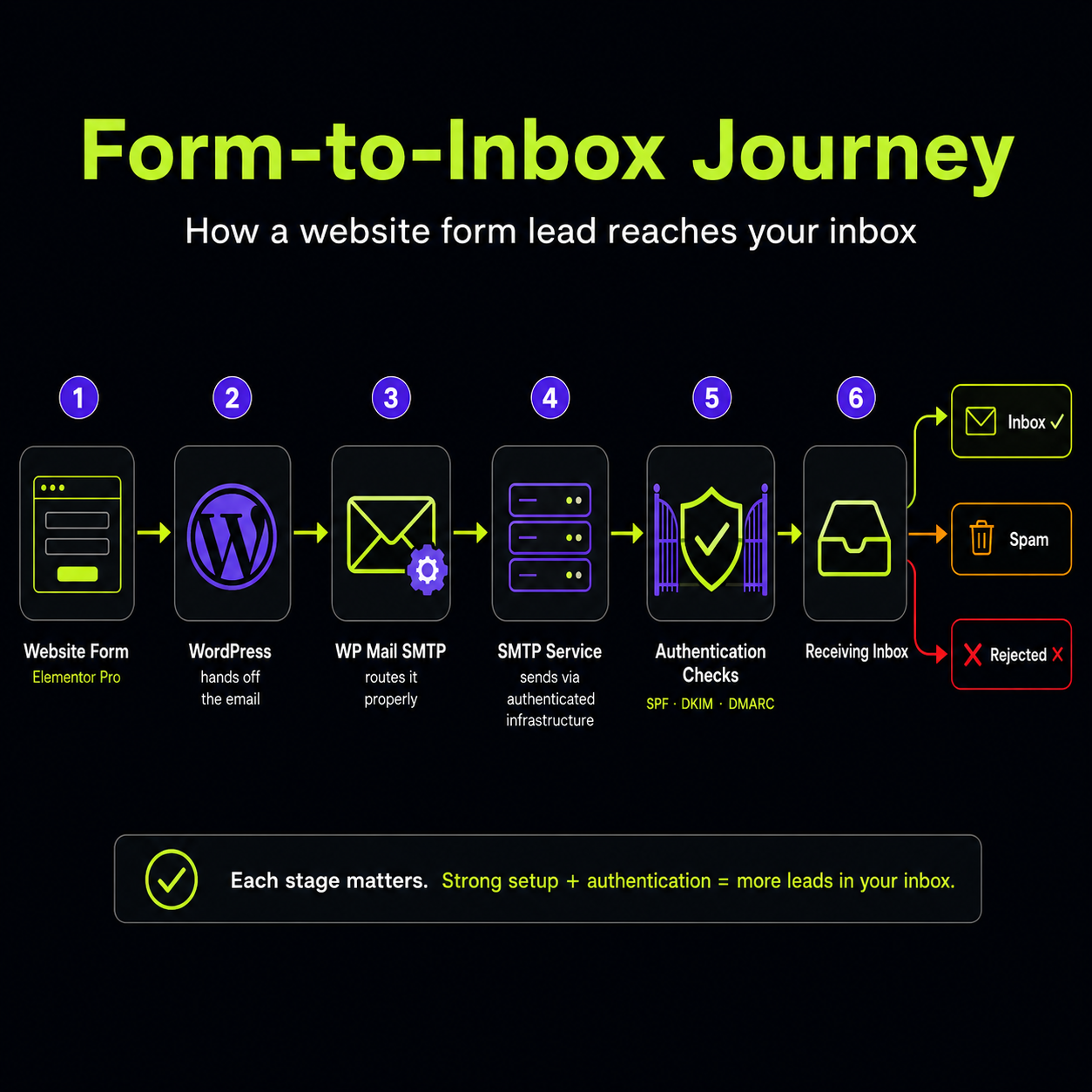
1. The form. On most of the sites we build, the form is Elementor Pro. It collects the name, email, phone and message. At this stage it’s just data sitting in the browser. No email has been sent yet.
2. The handoff to WordPress. When the visitor clicks submit, Elementor passes the details to WordPress and asks it to send an email notification to you. This is where a hidden problem lives: WordPress’s built-in email function is notoriously unreliable. By default it tries to send mail directly from the web server, and most hosts and inboxes distrust mail sent that way. It frequently vanishes with no error.
3. The SMTP plugin. To fix that, we use WP Mail SMTP. Instead of letting WordPress send mail its own unreliable way, this plugin routes the email through a proper, authenticated mail service. Think of it as the difference between dropping an unlabelled envelope in a random postbox versus lodging it at the post office counter with proper return details. Same letter, completely different chance of arrival.
4. The SMTP service. WP Mail SMTP hands the email to an actual sending service over SMTP (Simple Mail Transfer Protocol, the standard method computers use to send email). This service is a specialist whose entire job is getting mail delivered. It has established sending infrastructure and a reputation that inboxes recognise.
5. Authentication checks. As the email travels, the receiving inbox (usually Gmail or Microsoft 365) runs three checks to decide whether to trust it. These three are the heart of nearly every deliverability problem, so they’re worth understanding:
6. The inbox decision. Finally, the receiving inbox weighs all of the above plus the content of the message itself, and decides: inbox, spam, or rejected outright.
Every one of these six steps is a place where a real lead can go missing. The most common failure points are steps 2, 5 and 6.
Two things happened on our side that are worth being open about, because they directly affect lead delivery.
We moved client leads to send from forms.newwavedm.com. Previously, form notifications were sent in a way that made authentication inconsistent. We now route client lead notifications through a dedicated sending domain, forms.newwavedm.com, configured through our SMTP service. This gives every lead email proper SPF and DKIM signing from a domain we control and monitor.
We fixed our own DNS records. The DNS records for our sending domain (the SPF, DKIM and DMARC entries described above) needed correcting so that the authentication checks pass cleanly at the receiving end. One record in particular, the DMARC policy, was set to “quarantine,” which instructs inboxes to send anything borderline straight to spam. Even properly authenticated mail can get caught by an overly strict policy, so this required careful adjustment: strict enough to protect the domain, relaxed enough that genuine leads aren’t punished for looking slightly unusual.
If you’ve noticed lead delivery being patchy and then improving, this is why.
Routing leads through forms.newwavedm.com is a solid shared setup, and it works well. But there’s a better version.
Right now, many clients’ form notifications share the same sending infrastructure. That means the sender reputation is a blend of every site sending through it. If one site starts generating a lot of spam complaints or junk, it can drag on deliverability for everyone sharing that pipe. It’s a shared street address: mostly fine, but you’re affected by the neighbours.
The strongest possible configuration is for each client to have their own dedicated SMTP setup, sending from their own domain with their own authentication and their own sender reputation. Your deliverability then depends only on you. Nothing another business does can affect whether your leads land. For any business where enquiries are the lifeblood, whether that’s trades, healthcare, or anyone where a missed lead is a missed job, this is worth doing.
This isn’t automatic and it isn’t part of standard hosting. If you want your own dedicated SMTP setup, contact us and we’ll configure it for you.
Even with everything above done well, email has bad days. An inbox can misjudge a message, a filter can tighten overnight, a notification can sit unread in a busy inbox for hours. If email is the only way a lead reaches you, every one of those bad days is a lost job.
So for our clients we’re building in backup routes that don’t depend on the email landing at all.
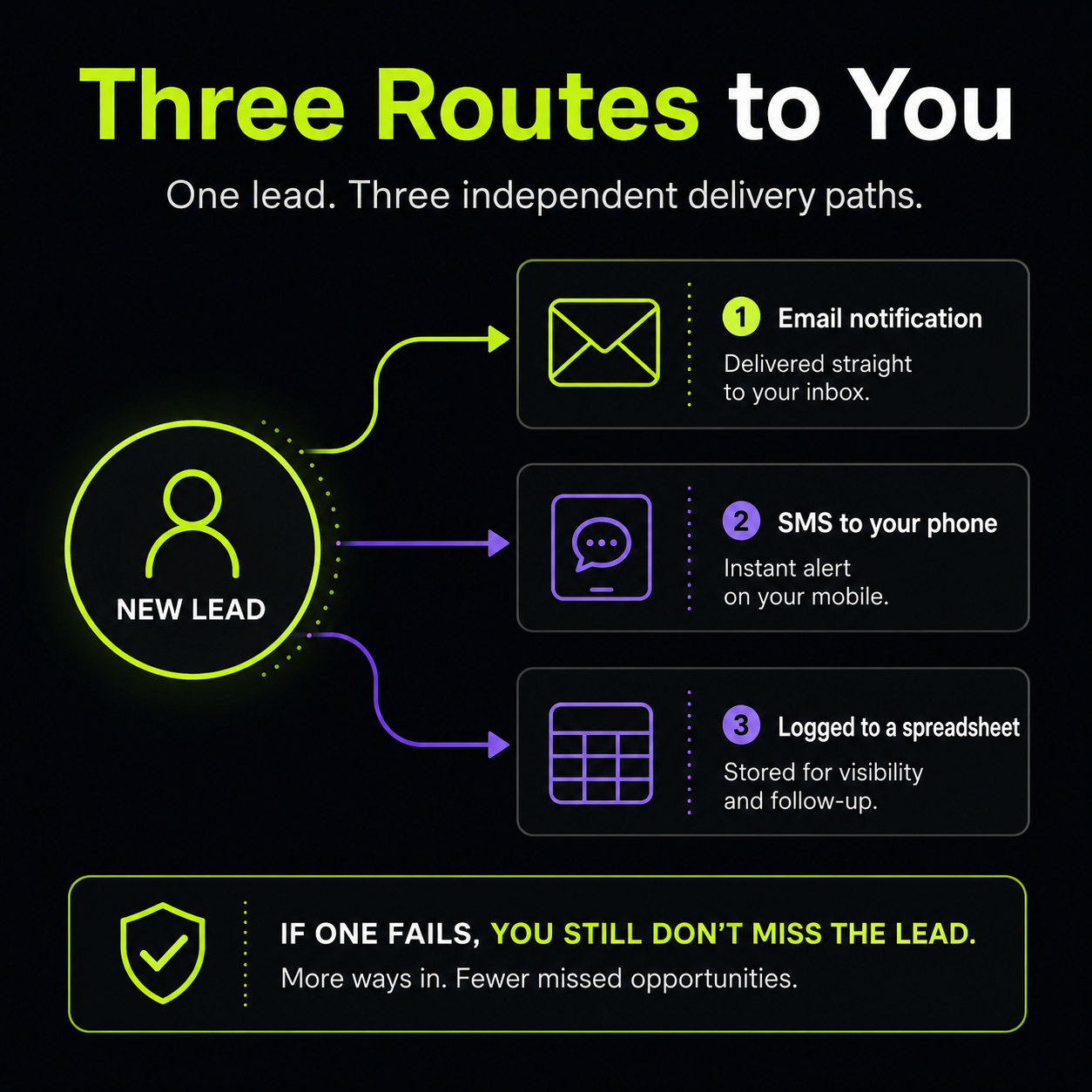
An SMS the moment a lead comes in. When someone submits your form, we can fire off a text message straight to your phone with the lead’s details. No app to check, no inbox to scroll. Your phone buzzes, you see the name and number, you call them back. For a tradesperson on a job or anyone who lives on their phone rather than at a desk, this is often the fastest a lead has ever reached them. And if the email version does end up in spam, it doesn’t matter, because you already have the text.
Every lead logged to a spreadsheet automatically. Alongside the notifications, we can drop each submission into a running spreadsheet as it arrives. That gives you one clean list of every enquiry your site has ever produced, with nothing depending on whether an individual email survived. It’s a live record you can search, sort, hand to a team member, or check at the end of the week to make sure nothing slipped through. It also quietly answers the “did we actually get any leads this month?” question with a real number instead of a guess.
Put together, that’s three independent ways a single lead reaches you: the email, the text, and the spreadsheet row. One can fail and you still don’t miss the enquiry. That redundancy is the whole point. A maintained website isn’t just one that’s online, it’s one where a customer trying to reach you actually gets through.
Everything above is about getting real leads to land. The mirror image is stopping fake ones, and there are a lot of them.
If your form has been live for more than a few weeks, you’ve probably seen submissions like these:
These fall into two types, and they need different handling.
Automated bot spam. Bots crawl the web filling in every form they find. High volume, low effort, usually with links or nonsense text. This is the easier type to stop.
Manual sales spam. A real person (or a convincing script) submits a genuine-looking pitch through your form. Harder to catch, because it can look a lot like a real enquiry at a glance.
Here’s the part worth being honest about: aggressive spam filtering and catching every real lead are in tension. Turn the filters up too high and you start losing genuine enquiries. Turn them down and the junk floods in. The goal isn’t perfection. It’s catching as much junk as possible while letting real people through. Anyone who promises to block 100% of spam with zero false positives doesn’t understand the trade-off.
We approach this in layers, because no single tool catches everything. Each layer handles what the others miss.
Honeypot. The first and simplest layer, built into Elementor Pro. A honeypot is an invisible form field that humans never see and therefore never fill in, but bots, which read the raw form code, fill in everything. If that hidden field comes back with data, we know it’s a bot and the submission is discarded. It’s completely invisible to real visitors, adds no friction, and quietly removes a good chunk of automated junk. We enable it as standard.
Authentication done properly. Counterintuitively, getting SPF, DKIM and DMARC right (the work described earlier) also helps here. Clean authentication improves the sender reputation of the whole lead pipeline, which means genuine leads are more likely to be trusted and less likely to be lumped in with spam.
Content and behaviour filtering, where needed. Honeypots stop dumb bots, but they don’t stop a human typing a sales pitch into your form. For sites that keep getting hit with that manual-style spam, the next layer is a dedicated spam-filtering service. The one we’re evaluating for this is CleanTalk, a service that checks each submission against a global database of known spammers and screens the content itself, catching the pitches and junk that slip past a honeypot. We haven’t rolled this out across all sites yet; we’re considering it specifically for websites that are still receiving too much spam despite the layers above. If your forms are getting buried in junk, it’s likely the next step we’ll recommend for your site.
Here’s something worth being upfront about. Everything described so far, the form, the SMTP service, the authentication, the DNS records, is the sender side. That’s our side. We can see it, test it, and fix it, and we have.
What we can’t see or control is the receiving side: the settings on your customer’s email provider, and the settings on yours. Every email provider makes its own independent decision about what to trust, and they don’t all use the same rules. An email that sails into a Gmail inbox can be treated with suspicion by Outlook, because the two providers weigh things differently. The message hasn’t changed. The receiver’s judgement has.
We’ve recently seen this first-hand. Microsoft’s providers, including Outlook, Hotmail and Microsoft 365, have been noticeably stricter than others, sometimes spam-filtering or outright rejecting genuine leads and emails from us that other providers accept without issue. This is a known pattern across the industry; Microsoft’s filtering has become more aggressive, and it affects legitimate senders, not just spammers. When a client on Outlook says leads aren’t arriving and a client on Gmail says everything’s fine, this is usually why.
That’s the honest limit of it: we can make an email as trustworthy as it can possibly be from our end, but the final call belongs to the receiving provider, and some receivers are tougher than others.
When a lead “doesn’t arrive,” it’s actually one of two quite different outcomes, and the difference matters.
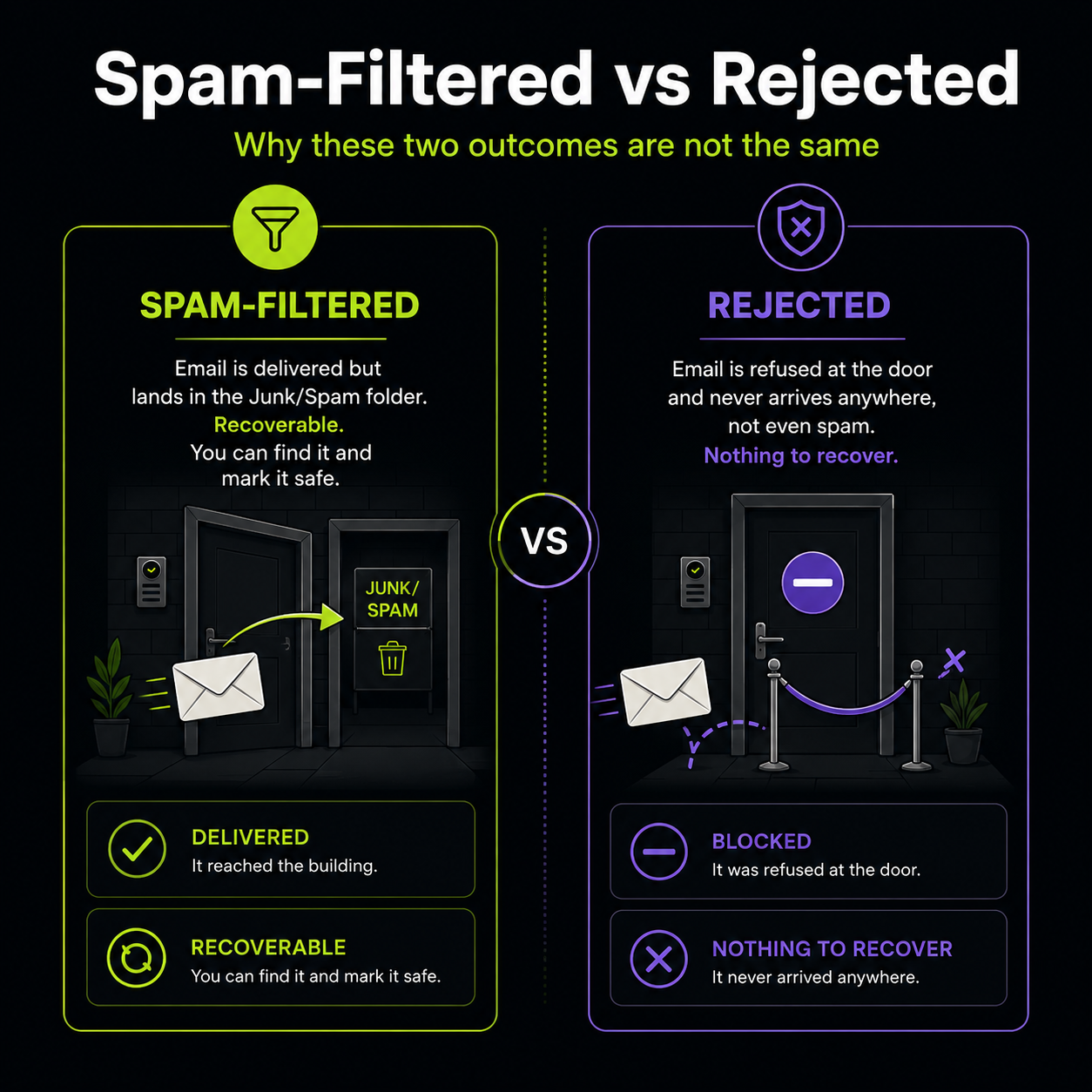
Spam-filtered means the email was delivered. It reached the inbox, but the provider decided it looked suspicious and dropped it into the Junk or Spam folder instead of the main inbox. The email exists. You can find it, open it, and mark it as safe. Nothing is lost; it’s just hidden in the wrong folder.
Rejected means the email was refused entirely. The receiving server looked at it and bounced it back at the door, so it never reached any folder at all, not even spam. There’s nothing to find, because it was never accepted. When Outlook rejects a message, the sending service gets a bounce notice, but the email itself is simply gone from the recipient’s side.
The reason this distinction matters: a spam problem you can fix from the inbox (find it, mark safe, add a rule). A rejection you can’t, because there’s nothing sitting in a folder to rescue. It has to be solved further upstream, at the authentication and reputation level, which is the work on our side. So if you’re on Outlook and leads seem to be vanishing with nothing in your spam folder either, that points to rejection rather than filtering, and it’s worth telling us so we can dig into it.
You don’t have to take any of this on faith. Here’s a quick manual check you can run yourself to see where your leads are actually going.
Check your spam or junk folder first. Search it for your lead notification sender address (for our clients, that’s the address your form emails come from). If leads are sitting in there, that’s spam-filtering, and it’s fixable from your end. See the next steps.
Send yourself a test. Fill in your own website’s contact form as if you were a customer, using a real email address, and watch where the notification lands: inbox, spam, or nowhere. Do it from a couple of different email accounts if you can, for example one Gmail and one Outlook. If it lands in Gmail but not Outlook, you’ve just confirmed the receiver-side difference described above.
Mark anything you find as “not spam” or “not junk.” In the folder, this tells your provider the sender is safe and nudges future emails toward the inbox.
Add the sender to your safe senders / contacts. Both Gmail and Outlook let you create a rule or add an address to a safe list so its mail always skips the spam folder. This is the single most effective thing you can do on your own end, and it takes a couple of minutes.
If nothing arrives anywhere, not even spam, flag it to us. That’s the signature of a rejection rather than a filtering problem, and it needs fixing on the sender/authentication side. Tell us which email provider you’re on (Gmail, Outlook, Microsoft 365, or something else), because that tells us a lot about what’s likely happening.
If you’re not sure how to do any of these on your specific email provider, we can walk you through it for your exact setup.
It’s worth setting a realistic expectation. Some genuine enquiries will occasionally land in spam no matter what, usually because of what the person wrote, not any fault in the setup.
A real customer asking urgently about a large sum of money, using words like “quick funding” or “borrow” with dollar figures, can trip an inbox’s content filters because that language pattern is common in actual scams. The person is legitimate; the words set off alarms. No amount of authentication or form filtering fixes this, because the filter is reacting to the message content, not the sender.
The practical safety net for this is the safe-sender rule described above: tell your email to always trust messages from your lead notification address, so they skip the spam folder regardless of content. Combined with the SMS and spreadsheet backups, it means even a content-flagged lead still reaches you.
Reliable lead delivery touches a few of the things we look after, so it’s worth knowing which service covers what.
Hosting keeps the site online, but on its own it does not troubleshoot form or SMTP delivery. That’s stated plainly in our hosting inclusions: hosting is the environment, not the maintenance of what runs inside it.
Our Care Plans include tracking and form monitoring, so delivery issues get noticed and handled as part of ongoing upkeep rather than only when something breaks. On the Growth Care tier, form and tracking monitoring is proactive.
The Fourth Wave Hub takes lead reliability a step further. The SMS alerts, the live record of every enquiry, the instant text-back to the customer, automated follow-up: the backup routes described above are exactly what the Hub is built to run as one managed system, rather than as separate pieces bolted onto a site. A lead that comes through the Hub is captured, logged and actioned even if the email notification itself has a bad day. If losing leads to slow or missed follow-up is a real concern for your business, this is the system built to solve it.
A Website Audit & Refresh includes a full check of form testing, SMTP and email delivery, and contact form notifications, so if you’ve inherited a site and have no idea whether its forms even work, this is how we find out and fix what’s broken in one pass.
Getting a website enquiry from a form into your inbox is a genuine technical process with a lot of moving parts: Elementor Pro collects it, WP Mail SMTP and an SMTP service send it, SPF, DKIM and DMARC prove it’s trustworthy, and the receiving inbox makes the final call. Break any link and leads go missing.
We’ve moved client leads onto a properly authenticated sending domain, corrected the DNS records that were sending good mail to spam, and we layer honeypot filtering (with CleanTalk where sites need more) to keep the junk out without blocking real people. On top of that we build in backup routes, an SMS the moment a lead arrives and every enquiry logged to a spreadsheet, so a single lead reaches you three different ways and one failure never means a missed job. The strongest setup, your own dedicated SMTP, is available if you want your lead delivery to depend on nothing but you.
This is what a maintained website actually means. Not just online, but genuinely reliable at the one job that matters most: getting a customer who’s trying to reach you through to you.
If leads landing in spam has been a problem, or you want SMS alerts, lead logging or your own dedicated SMTP set up, get in touch. It’s exactly the kind of thing we sort out.
New Wave Digital Marketing builds and maintains websites, lead systems and automation for local service businesses on the Gold Coast and across Australia.
Free calculator
Most business owners have no idea how much revenue their Google ranking is leaving on the table. Find out yours in 2 minutes.
Calculate What #1 Is Worth →Free · No sales call